
Understanding Message Queue
The Problem: Why Do Message Queues Exist?
Imagine you're building a photo-sharing app like Instagram. A user uploads a photo, and your server needs to do several things with it:
- Resize it into multiple resolutions
- Apply filters
- Run content moderation checks (nudity detection, policy violations, etc.)
Each of these operations takes a couple of seconds.
The Naive (Synchronous) Approach
In the simplest architecture, the client uploads the photo, and the server does all of that work synchronously before returning a response.
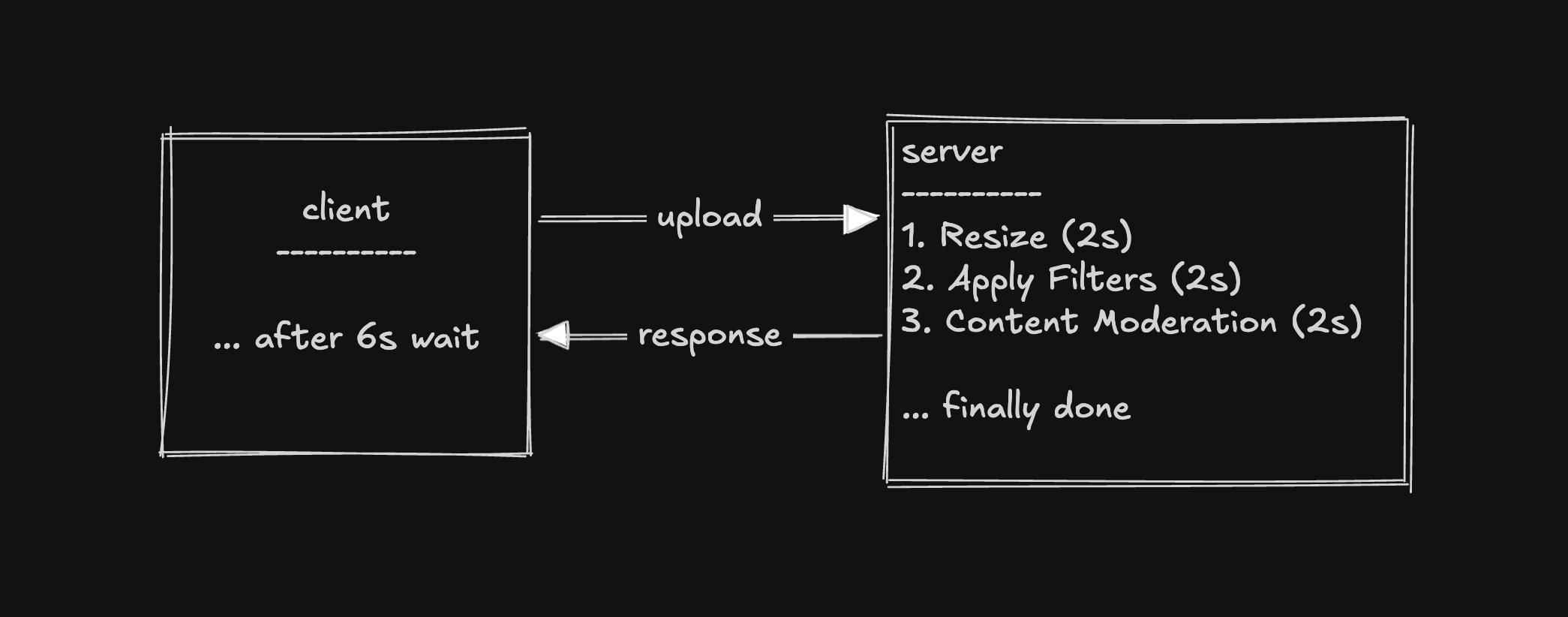
This works, kind of, but has three serious problems:
- Latency: The user wait for ~6 seconds waiting for all processing to complete before getting a confirmation.
- Fragility: If one service crashes halfway through, the entire upload fails. All prior work is lost. The user gets an error and must retry from scratch.
- Heavy Traffic: If uploads spike from 50/sec to 50,000/sec (e.g., app gets featured in the App Store), servers that can only handle ~200/sec will cause the other 49,800 requests to time out, fail, or error out. The system falls over.
The Solution: A Message Queue
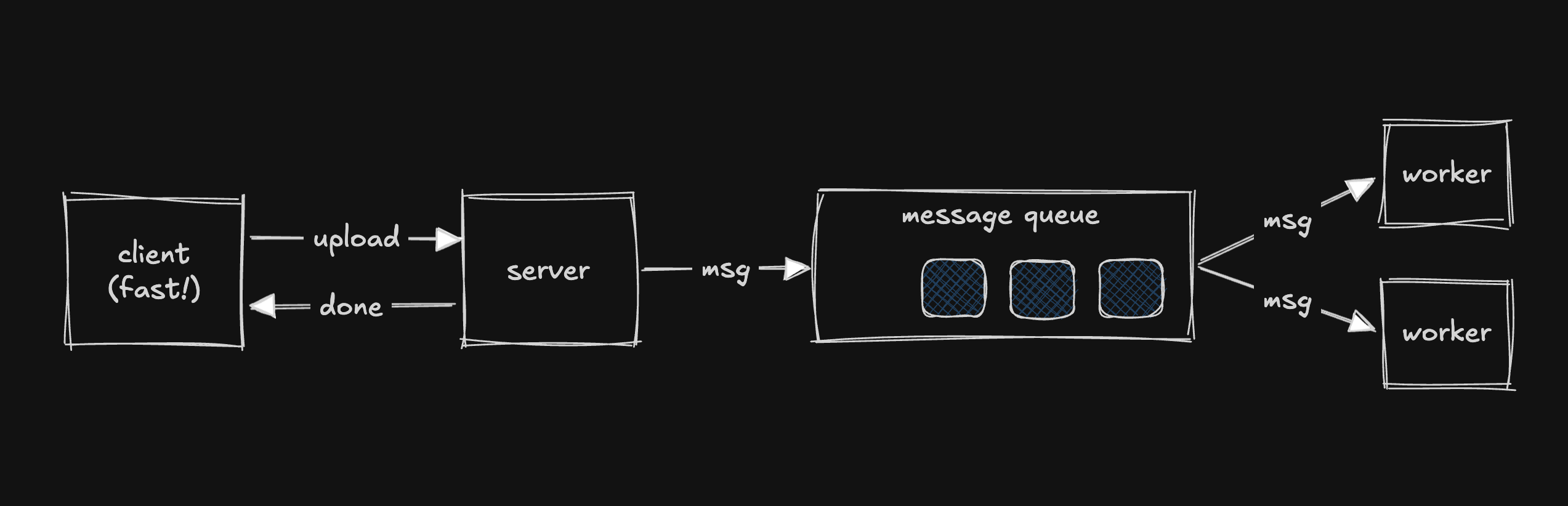
Instead of processing the photo immediately, the server:
- Saves the file (e.g., to object storage)
- Writes a message to a queue: "Photo 456 needs processing"
- Immediately responds to the client: "Upload complete!"
On the other end of the queue, a pool of worker servers (consumers) pull messages one at a time and process them.
How this solves each problem:
- Latency: The server only saves the file and drops a message — response is near-instant. The user can see a single-resolution photo while the rest processes in the background.
- Fragility: If a worker crashes, the message is redelivered to another worker. Nothing is lost.
- Heavy Traffic: The queue simply gets deeper. Messages wait to be processed. At worst there's a delay, but nothing is dropped or errored out.
What Exactly Is a Message Queue?
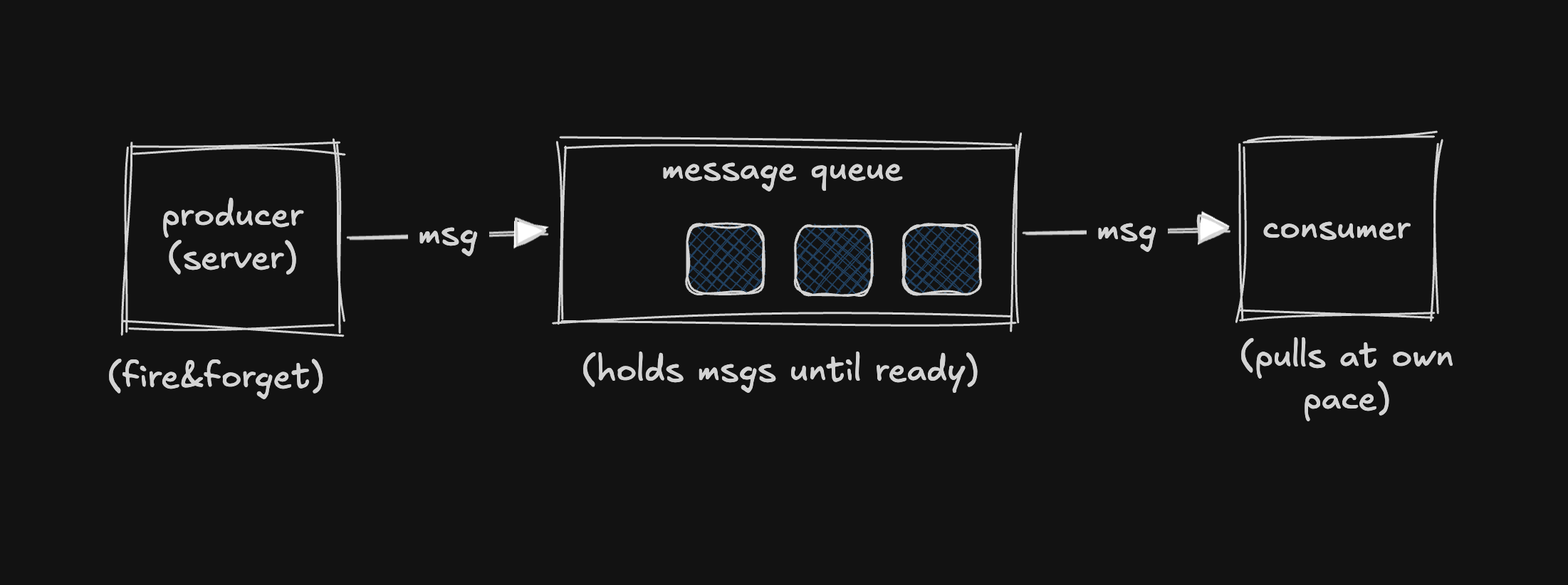
A message queue is a buffer that sits between a producer and a consumer.
- Producer: The service that creates the work (e.g., the upload server).
- Consumer: The service that does the work (e.g., the worker pool).
How it works:
- The producer sends a message and totally forgets about it. It doesn't care when or even if the message gets processed.
- The consumer pulls messages off the queue and processes them at its own pace.
- The queue's only job: hold on to messages until some consumer is ready to deal with them.
Decoupling
The producer and consumer don't know about each other. This means you can:
- Scale them independently
- Swap either side without affecting the other
KITCHEN ANALOGY: Think of it like a restaurant kitchen: The waiter puts the order on the ticket rail and immediately goes to serve other tables — they don't stand there waiting for the cook. The ticket rail decouples the front of house from the back of house, exactly like a message queue decouples producers from consumers.
How It Works Under the Hood
Acknowledgements (ACKs)
The problem: A worker pulls a message and starts processing. Halfway through, it crashes. If the queue deleted the message the moment the worker grabbed it, that photo is lost forever.
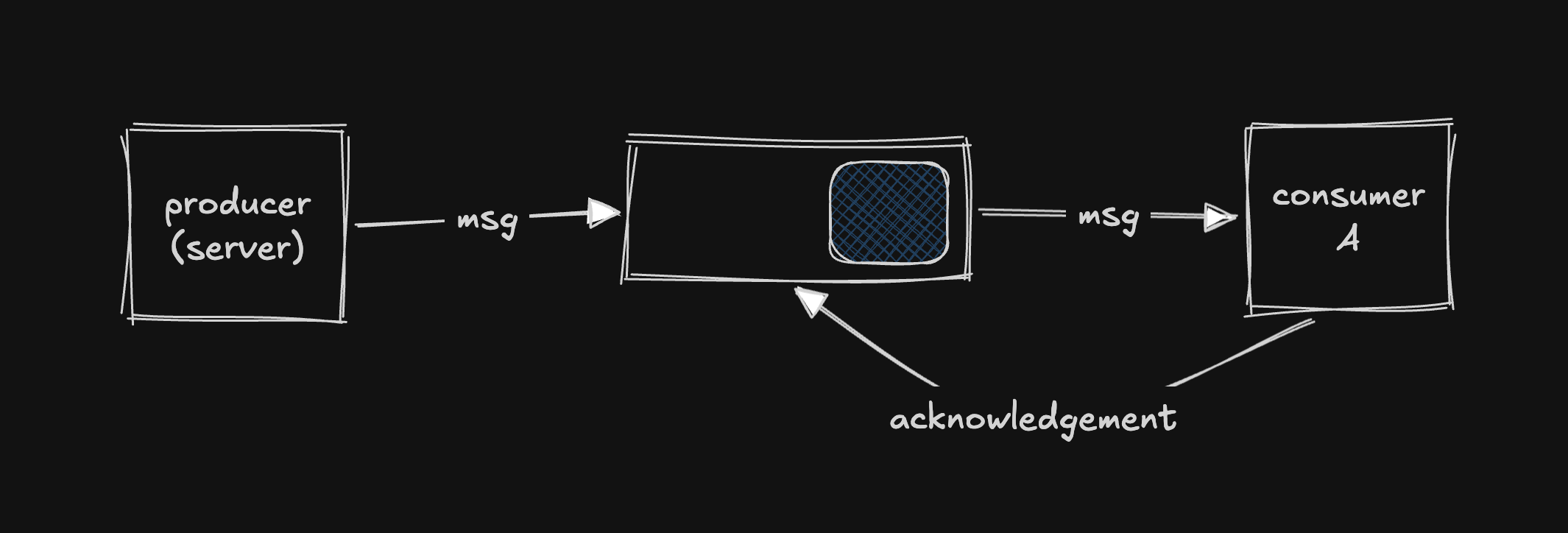
The solution: When a consumer pulls a message, the queue doesn't delete it right away. The consumer must explicitly send an acknowledgement (ACK) back to the queue saying: "I'm done with this one. You can delete it now."
If a consumer crashes before sending the ACK, the queue assumes it wasn't processed and redelivers it to another consumer. Nothing is lost.
Preventing Duplicate Processing
While Worker A is processing a message (hasn't ACK'd yet), the message is technically still in the queue. What stops Worker B from grabbing it too?
Different systems handle this differently:
| System | Approach |
|---|---|
| SQS (Amazon) | When a consumer picks up a message, it becomes invisible to all other consumers for a configurable window (e.g., 30 seconds). If ACK'd in time, it's removed. If not, it becomes visible again for retry. |
| Kafka | Each partition is assigned to exactly one consumer in a consumer group. No competition in the first place. |
| RabbitMQ | Uses channel-level prefetch limits and ACK timeouts to manage this. |
The concept is always the same: every queuing system needs a way to ensure a message is only being actively processed by one consumer at a time.
Delivery Guarantees
Even with ACKs, there's a tricky edge case: What if a worker processes a message successfully but crashes right before sending the ACK? The queue thinks it was never processed, so it redelivers it — and the same work happens twice.
For photo resizing, this is harmless. But for "Charge someone $50", a duplicate means he gets charged $100.
There are three delivery guarantees:
1. At-Least-Once Delivery (Most Common)
Every message is delivered at least one time, but it might be delivered more than once.
Implication: Consumers must be idempotent — processing the same message twice produces the exact same result.
IDEMPOTENT (safe):
  "Set user 123's profile photo to photo_5"
  → Running twice: photo is still photo_5.

NOT IDEMPOTENT (dangerous):
  "Increment user 123's post count by 1"
  → Running twice: count goes up by 2.

FIX: Rephrase as idempotent operation:
  "Set user 123's post count to 54"
  → Running twice: count is still 54.
2. At-Most-Once Delivery (Fire and Forget)
The message is deleted immediately when a consumer takes it. If something goes wrong, at most one consumer processed it — at worst, nobody did.
Use case: Analytics events or metrics where losing a few data points is acceptable.
3. Exactly-Once Delivery (The Holy Grail)
Every message is processed exactly one time. True exactly-once is extremely hard to achieve in distributed systems. Kafka supports a form of it for specific patterns within its own ecosystem, but it comes with real trade-offs and limitations.
When to Use a Message Queue?
Four signals to look for:
- Async Work: User doesn't need an immediate result (sending emails, generating reports, processing uploads).
- Bursty Traffic: You need to absorb traffic spikes without dropping requests. The queue smooths out load by accumulating a backlog.
- Decoupling: Producer and consumer have completely different scaling or hardware needs (e.g., lightweight upload service vs. GPU-heavy image processing).
- Reliability: You can't afford to lose work. If a downstream service is temporarily unavailable, the queue holds the message until it comes back.
Warning: Don't Queue Synchronous Workloads
If you have strong latency requirements (e.g., sub-500ms response times), adding a queue nearly guarantees you'll break that constraint. Queues add complexity around getting results back to the client, and inherently introduce delay.
Scenarios & Work around them
1. Increased Throughput: Scaling — Partitions & Consumer Groups
A single queue can only handle so much. To scale, you partition — split the queue into multiple independent sub-queues.
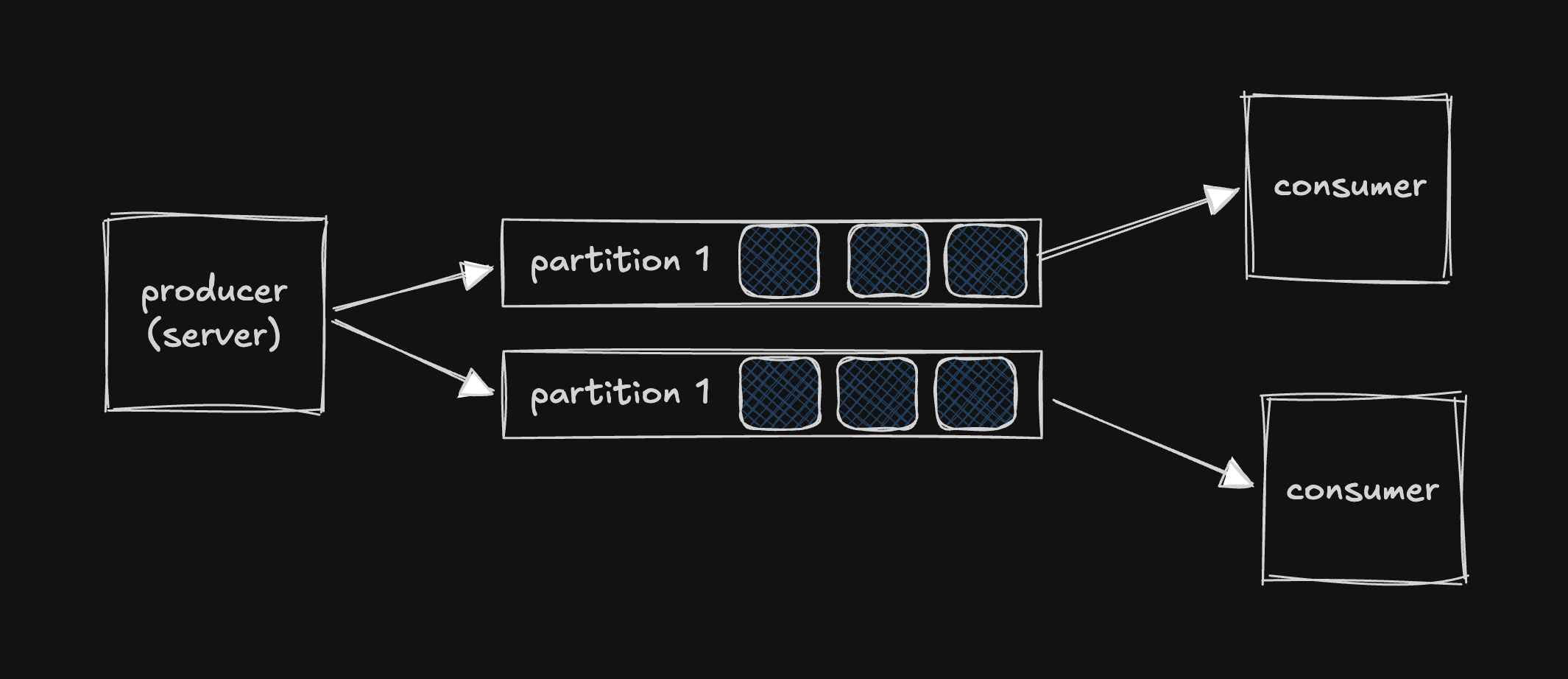
- Different workers process different partitions in parallel → throughput scales horizontally.
- A consumer group is a pool of workers that divide partitions amongst themselves.
- 6 partitions + 3 consumers = each consumer handles 2 partitions.
- Ceiling: You can't have more consumers than partitions. 6 partitions + 7 consumers = 1 consumer sits idle.
Choosing the Partition Key
The partition key determines which message goes to which partition(something like shard key). It matters for two reasons:
1. Ordering
Messages with the same partition key always go to the same partition. Within a partition, order is guaranteed. Right order is really necessary for some scenario. (e.g. bank transaction).
2. Even Distribution
You want partition keys that spread work evenly. As example, for a ride sharing app like pathao -
BAD key: city
  Partition "Dhaka" → slammed (hot partition 🔥)
  Partition "Rajshahi"    → idle

GOOD key: ride_id
  Evenly distributed across all partitions
Trade-off: The key that gives you ordering might not be the key that gives you the best distribution. Choosing the right partition key is worth careful thought around both factors.
2. Back Pressure: When Producers Outpace Consumers
If producers create messages faster than consumers can process them, the queue grows indefinitely. A queue doesn't solve a capacity problem — it just delays it.
Producers: 300 msg/sec
Consumers: 200 msg/sec
─────────────────────────
Queue growth: +100 msg/sec  → eventually runs out of memory
Three ways to handle:
- Auto-scaling: Monitor queue depth. When it grows too large, spin up more consumers or add more partitions.
- Back Pressure: Slow the producers down. Start rejecting messages or returning errors: "We're overloaded, try again in a minute."
- Alerting & Monitoring: Set alerts on queue depth to know when this is happening. The bare minimum.
A queue is a buffer, not a solution to insufficient capacity.
3. Failed Messages & Dead Letter Queues (DLQ)
What if a message always fails? (e.g., a corrupted photo that will never process successfully.) This is called a poison message — it crashes the consumer every time and can never recover.
Without guardrails, it retries forever, blocking everything behind it.
Solution: Max Retry Count + Dead Letter Queue
- Configure a max retry count (e.g., 5).
- After max retries, shunt the message to a Dead Letter Queue (DLQ) — a separate queue where failed messages go for later inspection (by an admin, an automated system, or even an AI model).
- Meanwhile, the main queue keeps moving.
Mentioning DLQs proactively shows seniority and understanding of real failure scenarios.
4. Durability & Fault Tolerance: What If the Queue Goes Down?
Modern message queues like Kafka persist messages to disk and replicate them across multiple brokers (servers).
- Same concept as read replicas in databases.
- Kafka stores messages on disk with a configurable retention window (a day, a week, or forever).
- This enables message replay — you can reprocess data from the past.
Replay scenario: Consumers go down for an hour. The Kafka queue backs up — no big deal. When consumers come back, they process the backlog. Even more powerful: if a consumer had a bug and processed things incorrectly, you can deploy a new consumer and tell it to reprocess from an hour ago, even though those messages were already consumed.
Common Message Queue Technologies
You don't need to know all of these, but you should be comfortable talking about at least one. If you don't have a default, choose Kafka.
| Technology | Key Characteristics | Best For |
|---|---|---|
| Kafka | Distributed streaming platform. High throughput, durable (writes to disk), scales via partitions, supports consumer groups. Messages aren't removed after consumption — they persist for a retention period, enabling replay. Can act as both a message queue and a stream processing system. | The industry standard most versatile choice. |
| SQS (Amazon) | Fully managed AWS service. No infrastructure to manage. Two flavors: Standard (best-effort ordering, high throughput) and FIFO (strict ordering, lower throughput). Uses visibility timeout for duplicate prevention. | When you want simplicity and are okay using hosted cloud solutions. |
| RabbitMQ | Traditional message broker. Supports complex routing via exchanges and bindings. Uses channel-level prefetch limits and ACK timeouts. | Sophisticated message routing logic. |
Summary & Key Takeaways
- Message queue is a buffer between producers and consumers that holds messages until they're ready to be processed.
- It reduces latency, isolates failures, absorbs bursty traffic, decouples services.
- Consumers must explicitly acknowledge messages; unacknowledged messages are redelivered.
- At-least-once (with idempotent consumers) is almost always the right answer.
- Suitable for async work, bursty traffic, decoupling, reliability needs. Not for synchronous, low-latency workloads.
- Handle scaling by partitioning the queue; use consumer groups. Choose partition keys carefully for ordering vs. distribution.
- Queues delay capacity problems, they don't solve them. Auto-scale, apply back pressure, and set alerts.
- Max retry count + Dead Letter Queue (DLQ) to prevent one bad message from blocking everything.
- Modern queues (Kafka) persist to disk, replicate across brokers, and support message replay.
If you enjoyed reading this, you can connect with me on X or Linkedin. Also, you can check out my other guides.